PyCon 2012
Headed off for PyCon 2012 tomorrow. Last one I was at was 2007 in Dallas, can't believe it's been 5 years. Looking forward to seeing some cool stuff, and maybe playing some games in the evening.
Headed off for PyCon 2012 tomorrow. Last one I was at was 2007 in Dallas, can't believe it's been 5 years. Looking forward to seeing some cool stuff, and maybe playing some games in the evening.
Using scgi-inetd-wsgi
Previously, I wrote about running CGI Scripts with Nginx using SCGI
with the help of a super-server such as inetd and a small C shim that
takes a SCGI request from stdin and sets up a CGI enviroment.
There's also a companion project on GitHub for doing something similar with Python WSGI apps. The code works on Python 2.6 or higher (including Python 3.x). It can easily be patched for Python 2.5 or lower by with a simple string substitition mentioned in the source file
It's not something you'd want to run a frequently-accessed app with, because there'd be quite a bit of overhead launching a Python process to handle each request. It may be useful however for infrequently used apps where you don't want to have to keep and monitor a long-running process, or for development of a WSGI app where you don't want to have to stop/start a process everytime you make a change.
Let's take a look at a diagram to see what the flow will be:
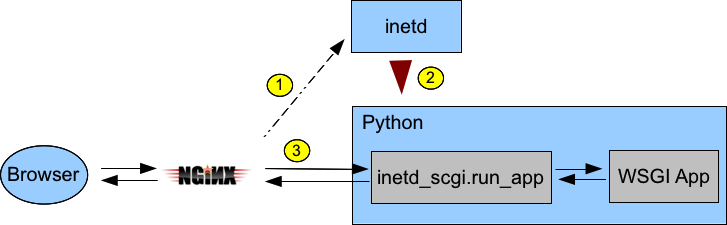
inetd_scgi and call its run_app function
passing a WSGI app to actually handle the request. run_app will read
the SCGI request from stdin, setup a WSGI enviroment, call the handler, and
send the handler's response back to Nginx via stdout.Here's how you'd wire up the Hello World app from PEP 3333
#!/usr/bin/env python
HELLO_WORLD = b"Hello world!\n"

def simple_app(environ, start_response):
    """Simplest possible application object"""
    status = '200 OK'
    response_headers = [('Content-type', 'text/plain')]
    start_response(status, response_headers)
    return [HELLO_WORLD]

if __name__ == '__main__':
    import inetd_scgi
    inetd_scgi.run_app(simple_app)
If you had saved that script as say /local/test.py, you might add this to
/etc/inetd.conf to serve it up:
:www:www:200:/var/run/test.sock stream unix nowait/4 www /local/test.py /local/test.pyand in Nginx with:
location /test {
    scgi_pass unix:/var/run/test.sock;
    include /usr/local/etc/nginx/scgi_params;
    fastcgi_split_path_info ^(/test)(.*);
    scgi_param  SCRIPT_NAME $fastcgi_script_name;
    scgi_param  PATH_INFO $fastcgi_path_info;
}
Then, accessing http://localhost/test should show 'Hello world!'
I attended OSCON for the first time this year, and to celebrate I thought I'd wrap up the Python amqplib library a bit and consider it more-or-less finished for what it is (a simple blocking 0-8 client), and call it 1.0.0 You can find it on the in PyPi and Google Project Hosting
It's definitely a worthwhile upgrade in that it's significantly faster than amqplib 0.6.1, and has a fair number of bug fixes. Also noteworthy are support for Python 3.x (via 2to3) and IPv6
smbpasswd is a really old piece of software (9 years!) for generating NT/LM password hashes, suitable for use with Samba. It's in Debian/Ubuntu/Redhat repositories, and FreeBSD ports, and who knows where else.
Somehow it never got submitted to PyPi, but I took care of that today at the request of someone working on another Python module that wanted to use this as a dependency. Look for smbpasswd-1.0.2, or just easy_install smbpasswd if you're setup for that.
I changed the packaging slightly, so that the tarball extracts to smbpasswd-x.x.x instead of py-smbpasswd-x.x.x, and so bumped the version number to 1.0.2 just for the packaging changes. The library itself is unchanged.
However, I think you'd want to be very careful generating and storing LM hashes of user's passwords, they seem to be wildly insecure.
If your app can get by with just NT hashes, and you have a Python >= 2.5, you may be able to generate those using the standard Python library, and don't need this package at all. See the notes on my py-md4 page.
Wrapped up another release of py-amqplib, version 0.6 - which features a major reorganization of the codebase to make the library more maintainable and lays the groundwork for an optional thread-assisted mode that allows for flow control and timeouts (being worked on in a development repository).
For many years I've been using bpgsql, my own pure-Python PostgreSQL client, and I've finally sat down and got things somewhat polished up enough to put together as a real package.
One thing that motivated the work was the desire to use in with Django - after seeing psycopg2 do some funny things when used under mod_wsgi. There's no doubt it's slower, but it's much easier to hack on, and might be of interest to people running Djano under other Pythons such as PyPy or Jython. Getting it to pass all the Django unittests really ironed out a lot of bugs, so I think it's in fairly decent shape now.
Put out a new release of py-amqplib, labeled 0.5, featuring the reworking mentioned earlier of how frames from the server are handled, and a big speed-improvement in receiving messages that was prompted by doing some profiling after reading Initial Queuing Experiments on the Second p0st blog.
I noticed the other day that my two RabbitMQ servers were consuming more and more memory - one had gone from an initial 22mb size to over 600mb. As I sat and watched it would grow by 4k or so at regular intervals.
I think what had happened is that I had created an exchange which received lots of messages, and then ran scripts that created automatically-named queues bound to that exchange, but defaulted to not auto-deleting them. I ran these scripts many many times, which left many many queues on the server, all swelling up with lots of messages that would never be consumed. Good thing I caught it, it might have eventually killed my server.
This message in the rabbitmq-discuss list gives useful info on how to get in and see what queues exist on a RabbitMQ server, and how big they are.
It seems to me that having the auto_delete parameter of Channel.queue_declare() default to False is a really bad idea. If you want to keep a queue around after your program exits, I think you should explicitly say so, so I changed the default to True. The Channel.exchange_declare() also has a auto_delete parameter, which I also change the default to True for consistency.
I also did some work on supporting the redirect feature of AMQP, where a server you connect to can tell you to go somewhere else, useful for balancing a cluster. I don't actually have a RabbitMQ cluster, so I put together a utility to fake an AMQP server that tells you to redirect. It works well enough to run the uniitests unchanged against it, each test case being redirected from the fake server to the real server.
With those two changes, I put out a 0.2 release, on my software page and on the Cheeseshop.
I broke down and put together a tarball of my Python AMQP library, and stuck it up as a release 0.1 on the software section of this website, under the section py-amqplib.
Interestingly, someone hit the page and downloaded the tarball less than 3 minutes after I dropped a note about it to the RabbitMQ discussion list - so I guess there's at least some interest out there in this sort of thing :)
For some time I've been using Spread as a messaging bus between processes and machines using Python bindings, but there are a few things that make it not quite ideal for what I've been trying to do.
I ran across the Advanced Message Queuing Protocol(AMQP), with RabbitMQ as one implementation of the protocol, that looks like a better fit for my needs.
There's a Python client library available named QPID, but there are a few issues with that:
I decided to take a whack at my own AMQP client, partially as a learning excercise to learn more about the protocol. I wrote a program to take the AMQP 0-8 spec file and statically generate the skeleton of a Python module, and then fleshed it out by hand. The generator is able to put lots of documentation from the spec file into Python docstrings, so the pydoc of this module is fairly decent. Because the module is statically generated, it should be easier to debug than QPID which generates lots of stuff on-the-fly. It's also much faster at making the first connection because it's not parsing the spec file. I also thew in SSL support in since it wasn't too difficult.
It has a ways to go, and some parts are probably naively conceived, but it does seem to work.
The first thing I've used it for is a syslog->AMQP bridge. I've setup my FreeBSD syslogd to feed all info or higher events to a Python daemon, which extracts the date, time, program name, host name, etc and reformats as an AMQP message and published to a 'syslog' topic exchange with the program name as the routing key.
My plan is then to write other daemons that subscribe to the 'sshd' topic for example, and then generate higher-level messages that say things like: 'block IP address xx.xx.xx.xx' in case of failed login attempts. Then i just need one daemon to listen for these firewall control message and make changes to the PF tables.
It's fun stuff. The only weak part is that there's no way to tell if the original syslog message was spoofed, but after that point, AMQP access controls should keep things trustworthy.
See py-amqplib for a Mercurial repository and eventual downloads.